SALES COMMISSIONS

Sales commissions your teams can follow.

Bring plan rules, calculations, reviews and statements into one commission workflow. Use a RevexOne walkthrough to see how your plans and data would fit.

Plans and rulesCalculation detailReview workflow

INSIDE THE PLAN

Built step by step. Proved before it pays.

Plans are set up in numbered steps from 26 building blocks. Every run checks itself before a person approves it. See every rule and its status →
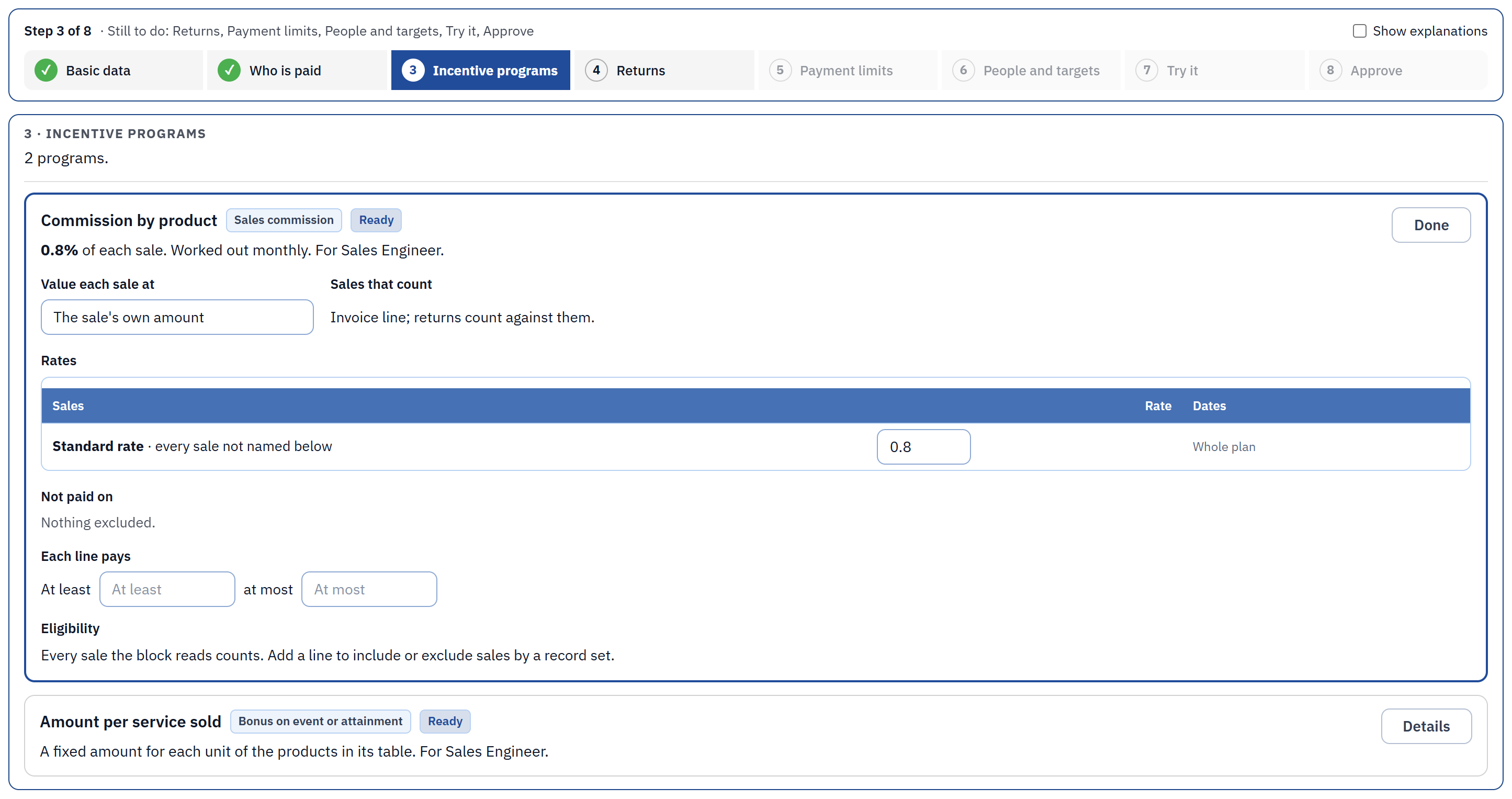
The plan builder: numbered steps from Basic data to Approve, showing the Incentive programs step
The plan builder: eight numbered steps, from basic data to approval. Each step opens ready to edit.
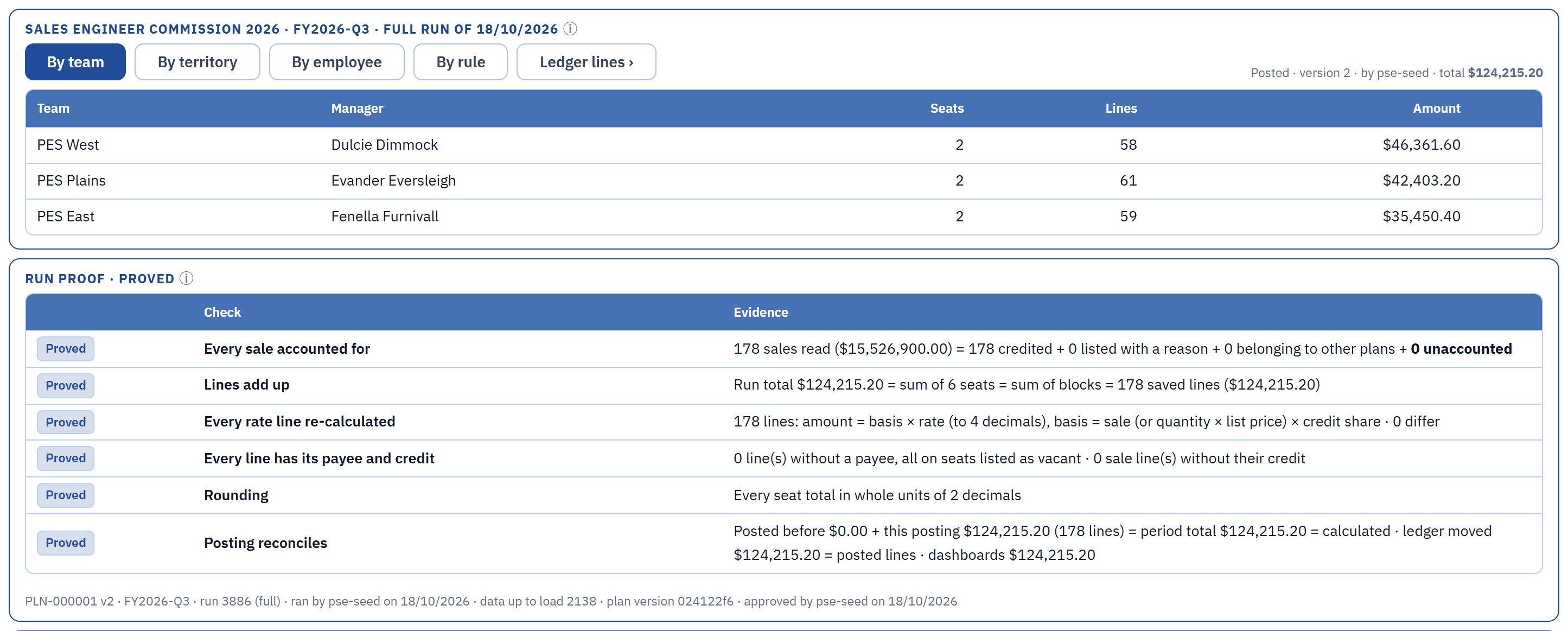
A calculation run with its run proof: every sale accounted for, lines add up, every rate line re-calculated, posting reconciles
The run proof: every sale accounted for, every rate line re-calculated and every total reconciled, with the evidence beside each check.

Screens from the RevexOne application, shown with invented test data. Layout may differ in the current release.

FROM PLAN TO STATEMENT

A clearer way to run the commission cycle.

01

Build the plan

Organize rates, tiers, eligibility and adjustments so the plan can be reviewed and maintained.

02

Understand the calculation

Follow how qualifying activity and plan rules contribute to earnings.

03

Review the cycle

Identify the items that need attention before results move to payout preparation.

04

Give sellers a clear statement

Help commission recipients understand the activity behind their earnings.

THE SELLER’S VIEW

What I earned, what is held back, and what was not paid.

Sellers see their own pay for the period, the statement behind it, and can raise a question on any line.


A seller’s pay summary: earned this period, earned this year, held back and not paid
My Pay: earned this period and this year, anything held back, and sales that earned nothing.
A seller’s statement with a question mark on each line to raise a question
The statement: each part of the plan, the sales it is based on and the amount. The question mark on a line raises a question about it.
  • What if: try closing a deal or changing a number and see the pay before it happens.
  • What changed in my pay: each change since the last run, with the reason.
  • Not paid and why: sales that earned nothing, with the rule that stopped them.
  • Disputes: raise a question on any statement line; the answer and any fix stay on the record.

Screens from the RevexOne application, shown with invented test data. Layout may differ in the current release.

SUPPORTED TODAY

The buying facts, in plain words.

Each is in the product today. Limits and the full list are in the rule catalogue → · One amount, rule by rule: how a calculation is built →

  • AvailableTiers and acceleratorsMarginal or whole-value tiers, year to date, accelerators above quota.
  • AvailableCredit and payout splitsSeveral seats credited on one sale; earned pay shared by percentage.
  • AvailableCaps, floors and guaranteesPer period, per year or per plan; minimum pay for new hires.
  • AvailableDrawsRecoverable or non-recoverable, with recovery limits.
  • AvailableClawbacks and returnsReversed at the rate that paid the sale, not today’s rate.
  • AvailableHoldbacks and compliance holdsPay held, released later or on clearance.
  • AvailableProrationBy days, working days, months or FTE in the seat.
  • AvailablePayroll and AP filesApproved pay goes out as files; payment is confirmed back.
  • AvailableDisputesA question on any statement line; the answer stays on the record.

NEXT STEP

Let’s talk through your commission cycle.

We can discuss current functionality, your source data and the steps needed for a well-scoped implementation.